Ludus: Instant Cyber Labs on Proxmox
I have been using Proxmox for a few years now and my solution for deploying VMs for the first year was always to deploy VMs one at a time from scratch. Then I started using the following process:
- Download ISO
- Deploy VM and install operating system
- Backup VM after base programs such as Docker are installed
- Restore from backup as a different VM if necessary
I had never used templates in Proxmox until I started using Ludus. It is amazing how templates turn your VMs from objects that you want to maintain into disposable objects. I know that I could have done the same thing with my backups, but since I use Proxmox Backup Server for backups, it is a lot faster to store a template locally. I had started to learn Ansible, but I never got too far because I would just build my cyber lab the old fashioned way and keep those VMs backed up as well.
What is Ludus?
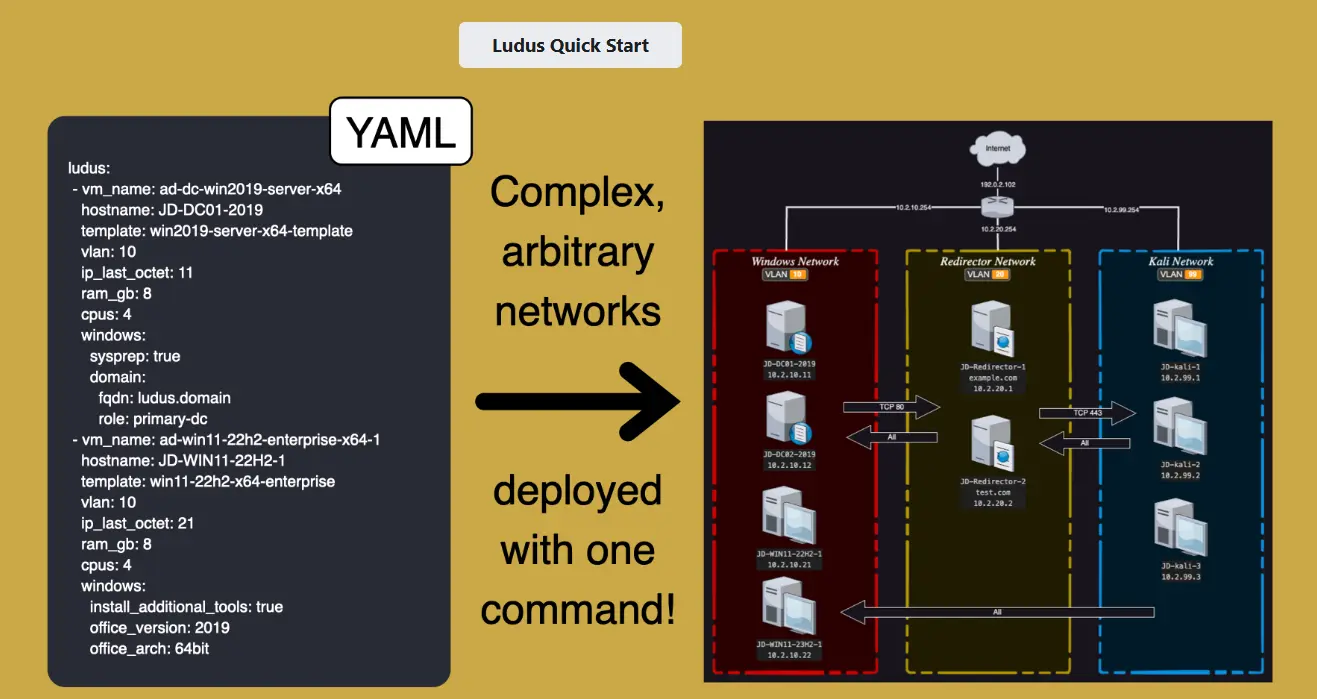
Ludus is an open-source, API-driven infrastructure management platform created by Bad Sector Labs. It is built on top of Proxmox and uses Packer and Ansible to deploy complex testing ranges from a single YAML configuration file. The platform is licensed under AGPLv3 and targets security professionals, QA teams, developers, and red/blue team operators seeking faster infrastructure provisioning.
The magic of Ludus is that it takes what would normally be hours or days of manual configuration and reduces it to a single command. Need an Active Directory environment with multiple domain controllers, workstations, and specific vulnerabilities? Define it in YAML and deploy.
Key Features and Components
Automated Deployment
Ludus enables users to deploy and configure complex networks with a single command through YAML-based configuration. No more clicking through wizards or manually configuring each VM.
Template System
Templates are built from scratch using ISO files rather than relying on pre-customized images. All builtin templates deploy the bare minimum to allow Ansible to work (python3/powershell and SSH/WinRM) and a user to connect via RDP, SSH, or KasmVNC. This approach supports true infrastructure-as-code practices.
Builtin Templates:
- Debian 11 and 12
- Kali Linux
- Windows 11 (22H2, x64 Enterprise)
- Windows Server 2022 (x64)
Additional Community Templates:
- Linux: Debian 10, Rocky 9, Ubuntu 20.04/22.04
- Windows: Windows 10 (21H1), Windows 11 (23H2), Windows Server 2012 R2, 2016, 2019
- Specialized: Commando VM, FLARE VM, REMnux
Network and Connectivity
- Up to 255 VLANs with customizable firewall rules
- Internal DNS with domain rewrite capabilities
- Direct access via SSH, RDP, VNC, or KasmVNC
- Built-in WireGuard server for secure remote connectivity
- VM isolation from internet connectivity when needed
Security and OPSEC Features
- Snapshot management before/after isolation
- Selective domain/IP allowlisting for testing scenarios
- Telemetry containment capabilities
- Multiple isolated ranges per server
My Experience
Using Ludus makes it almost too easy to set up an environment. I had just finished getting Game of Active Directory working on my Proxmox node the hard way. I set it up on my desktop using VMware and then exported it out and imported all the VMs into Proxmox. I got them setup on their private network. I setup Guacamole to remote into my Kali machine. Then I installed Tailscale on Kali so that I could remotely access my lab from anywhere.
This is an entirely different story, but once you get a VPN setup for your lab and get used to having the freedom to access it remotely, it is hard to go back. If I have a few minutes at the doctor’s office, I can spend that “playing” in my lab. I am not yet proficient in exploitation, or recon really. Recon takes me the longest. I have a hard time moving on to something else once I get an idea in my head.
With Ludus, that entire GOAD setup process becomes a configuration file and a few commands. The WireGuard integration means remote access is built-in from the start.
Available Labs and Environments
Ludus has an impressive collection of pre-built environment guides that you can deploy. Here are the labs currently available:
Active Directory Labs
Game of Active Directory (GOAD) - The flagship AD lab created by @M4yFly. A comprehensive vulnerable Active Directory environment for practicing attacks like Kerberoasting, AS-REP Roasting, delegation attacks, and more. There are also variants:
- GOAD - NHA - Network variant of GOAD
- GOAD - SCCM - Includes System Center Configuration Manager for practicing SCCM-specific attacks
Basic Active Directory Network - A simpler AD setup for those just getting started with Active Directory penetration testing.
ADCS - Active Directory Certificate Services lab for practicing certificate-based attacks, a critical skill given the prevalence of ADCS misconfigurations in enterprise environments.
SANS Workshop: Active Directory - Lab environment based on SANS training materials.
CTF and Workshop Labs
BarbHack CTF 2024 (Gotham City - Active Directory Lab) - A CTF-style Active Directory environment with a Batman theme.
Netexec Workshop (leHACK 2024) - Workshop environment for learning NetExec, the network execution tool used for lateral movement and credential testing.
Netexec Workshop (leHACK 2025) - Updated version of the NetExec workshop.
Security Research Labs
Malware Lab (xz backdoor) - A lab environment for studying the infamous xz backdoor (CVE-2024-3094), allowing safe analysis of this supply chain attack.
Elastic Security - Lab environment with Elastic SIEM for practicing detection engineering and blue team operations.
Pivot Lab - Environment designed for practicing network pivoting techniques, essential for moving through segmented networks during engagements.
Custom Ranges
Beyond pre-built environments, Ludus excels at letting you define custom ranges. Need a specific configuration for a client engagement or CTF preparation? Define your VMs, networks, and configurations in YAML and deploy.
Complete Setup Instructions for Proxmox
System Requirements
- x86_64 CPU with Passmark score exceeding 6,000
- Debian 12/13 or Proxmox 8/9 host
- Minimum 32GB RAM per user/range
- At least 200GB storage initially, plus 50GB per deployment
- Internet connectivity (wired, not WiFi)
- Root shell access
Prerequisites
You need a Proxmox 8 or 9 server. No reboot is required for existing installations.
Important Warning: Using an existing Proxmox installation may cause issues with existing customizations. The documentation strongly recommends a fresh Bare Metal Debian 12/13 installation if starting from scratch.
Installation Steps
There is a little bit of setup at the beginning, but nothing too complex. Then, there is a single install script that interactively installs Ludus. It asks you about storage and architecture.
Option 1: All-in-one command
curl -s https://ludus.cloud/install | bashOption 2: Verify the script first (recommended)
curl https://ludus.cloud/install > install.sh
cat install.sh
chmod +x install.sh
./install.sh
What the Installer Does
The installer will automatically:
- Extract files to
/opt/ludus - Install packages: ansible, packer, dnsmasq, sshpass, curl, jq, iptables-persistent, gpg-agent, dbus, dbus-user-session, vim
- Install Python packages: proxmoxer, requests, netaddr, pywinrm, dnspython, jmespath
- Create Proxmox groups, pools, networking interfaces, and system services
Post-Installation: Create a User
After installation, follow the Quick Start guide to create a user. You will receive an API key and WireGuard configuration.
Getting Started as a User
- Obtain API key and WireGuard configuration from the administrator (or yourself if self-hosting)
- Download or compile the Ludus client
- Import and connect the WireGuard VPN
- Execute
ludus apikeywith your credentials - Use the CLI for range management
Post-Installation Troubleshooting
Configuration adjustments: Edit /opt/ludus/config.yml and restart services:
systemctl restart ludus-admin
systemctl restart ludus
Storage permissions: If you need to grant access to new datastores:
pveum acl modify /storage/<name> -group ludus_users -role DatastoreUser
pveum acl modify /storage/<name> -group ludus_admins -role PVEDatastoreAdmin
Network issues: If VMs lack IP addresses or internet connectivity, consult the networking troubleshooting guide in the official documentation.
Why Ludus Changed My Workflow
The combination of Proxmox templates, Ansible automation, and WireGuard connectivity creates an environment where spinning up a complex cyber lab becomes trivial. Instead of spending a weekend configuring Active Directory, installing vulnerable services, and setting up networking, I can define what I want and let Ludus handle the implementation.
For anyone running a homelab focused on security research, CTF practice, or professional development, Ludus is worth exploring. The learning curve is minimal compared to the time saved, and the infrastructure-as-code approach means your lab configurations become reproducible and shareable.
Check out the official documentation at docs.ludus.cloud and the GitLab repository for more information.